
Local AI means running an AI model on your own computer instead of sending every prompt to a cloud service. It sounds simple. However, most people who say they “run AI locally” are still sending their data to a server somewhere. In this guide, we break local AI down into clear phases: what it really is, how to read model names, what hardware you need, three realistic builds, and the tools that run the models. Finally, we answer the big question honestly: who is local AI actually worth it for?
Quick Summary: Is Local AI Worth It?
- What it is: an AI model file (the “weights”) that lives on your disk and runs on your own hardware.
- Main benefits: privacy, offline use, no subscription, no rate limits, and nobody can retire or change your model.
- Main trade-off: you cannot run frontier-level models at home, so answers are less capable and often slower.
- The one rule: the model must fit in fast memory (VRAM or unified memory). Memory bandwidth then decides the speed.
- Verdict: for most people a $20–$60 monthly cloud subscription is still the better deal. Local makes sense when privacy, offline access or heavy daily usage matter.
Phase 1: What Does Local AI Actually Mean?
An AI model is just a large file full of numbers called weights. For example, a 17 GB file can hold everything a mid-sized model knows: facts, languages and coding patterns, all encoded as numbers. When you ask a question, your own CPU or GPU does the “thinking”. As a result, nothing is sent to a server.
You download the file once and it is yours. Nobody can deprecate it, quietly change its behaviour or move it to a more expensive pricing tier.
The Three AI Setups (Only One Is Truly Local)
To understand local AI properly, separate the tool (the app you type into) from the model (the brain that generates answers).
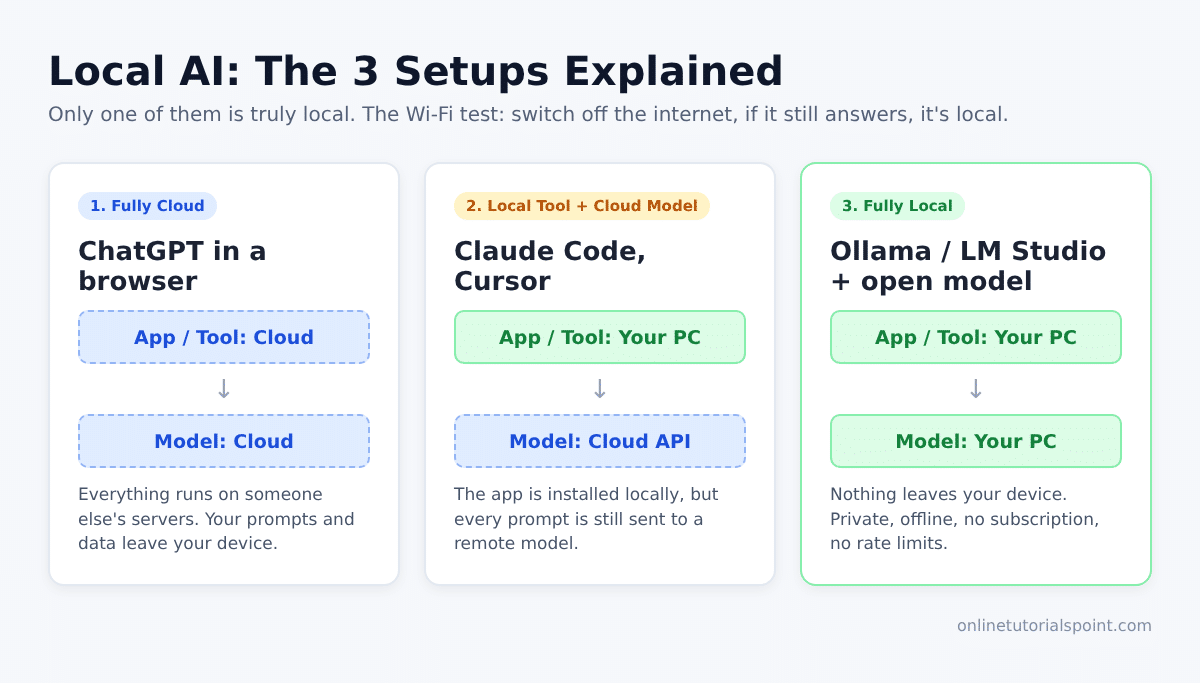
- Fully cloud: ChatGPT in a browser tab. Both the app and the model run on someone else’s computer.
- Local tool + cloud model: tools like Claude Code or Cursor are installed on your machine. However, they call a remote model, so your prompts and files still leave your device. Most “AI apps” work this way.
- Fully local: a local tool running a local model. Nothing leaves your device.
The simple test: turn off your Wi-Fi. If the app still answers, it is truly local.
The Honest Trade-off
Local AI is private, secure and fully under your control. The price you pay is intelligence. The best frontier models run in data centres that cost hundreds of millions of dollars. Even the largest open models, such as Kimi or GLM, have hundreds of billions to trillions of parameters, which is far beyond home hardware. Therefore, the smart approach is hybrid: use local models where they make sense, and switch to cloud models when you need top-level reasoning.
Phase 2: Choosing a Local AI Model
Most open models are published on Hugging Face, which is basically GitHub for AI models. The names look like gibberish at first. Once you decode them, though, picking a model becomes easy.
Decoding a Model Name
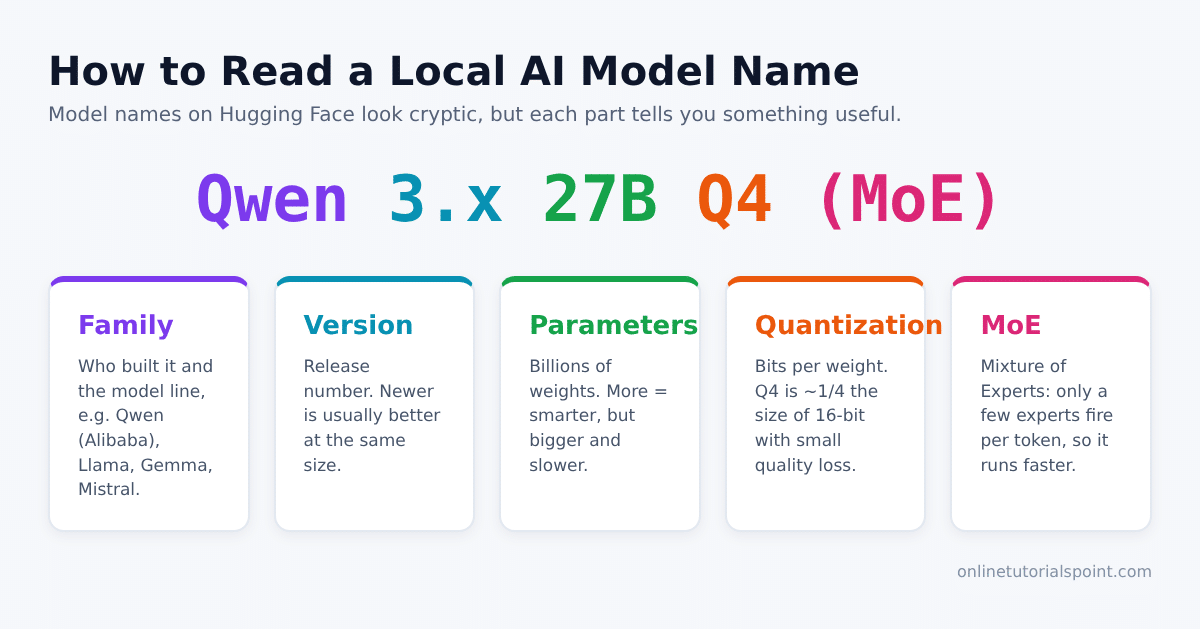
Take a name like Qwen3.x-27B-Q4 as an example:
- Qwen – the model family. Qwen is built by Alibaba and is one of the most downloaded local model families.
- 3.x – the version. Newer versions are usually better at the same size.
- 27B – 27 billion parameters (weights). More parameters usually means smarter, but also bigger and slower.
- Q4 – the quantization level, explained below.
What Is Quantization?
Quantization is compression for AI models. Normally, each weight is stored with 16 or 32 bits of precision. A Q4 model stores each weight in only 4 bits, so it shrinks to roughly a quarter of its original size with only a small drop in quality. Other common levels are Q6 and Q8. In short, the lower the Q number, the more compressed the model is. Quantization is the main reason large models fit on consumer hardware at all.
What Is a Mixture of Experts (MoE) Model?
A normal “dense” model fires every parameter for every token it generates. A Mixture of Experts model, by contrast, is split into many small experts, and only a few of them activate for each token. You still need enough memory to hold the whole model. However, it runs much faster because far less maths happens per token. MoE is one of the biggest recent wins for local AI, because it makes large models usable on affordable hardware.
Which Models Are Worth Downloading?
Models change every few months, so follow a rule rather than a fixed list:
- Check how much VRAM or unified memory you have.
- Pick a strong family, such as the latest Qwen release.
- Download the biggest model in that family that comfortably fits in your memory.
For reference, a 4B model needs only a few gigabytes, a 27B model is a great all-rounder for its size, and coder variants (such as Qwen3-Coder) or ~120B MoE models suit larger machines. For most readers, the sweet spot is roughly 8B to 35B parameters. Skip the trillion-parameter models you see on benchmark charts, because they can need over a terabyte of memory.
Phase 3: Hardware for Local AI – Memory Is Everything
One rule decides almost everything: the model must fit inside fast memory.
- On a Windows or Linux PC with a dedicated graphics card, fast memory means VRAM. An RTX 4090 has 24 GB, so the largest model it can hold is about 24 GB. That is roughly a quantized 27B–35B model.
- On a modern Mac, fast memory means unified memory. A 64 GB Mac can use most of that, but you must leave headroom for macOS and your other apps.
Size vs Bandwidth: What Really Matters
Memory size decides which models you can run. Memory bandwidth, on the other hand, decides how fast they run, measured in tokens per second.
- High-end NVIDIA GPUs (RTX 4090, 5090) offer over 1 TB/s of bandwidth, so they are very fast but limited in size.
- Most Macs and unified-memory mini PCs offer far more memory, but often at only 20–30% of a dedicated GPU’s bandwidth. Consequently, they fit bigger models but generate tokens more slowly.
So, before you buy anything, ask yourself one question: do I care more about raw intelligence (bigger models) or speed? Getting both is possible, but expensive.
Phase 4: Three Realistic Local AI Builds
RAM and VRAM prices have jumped sharply in 2026 because of a global memory shortage. Treat the prices below as rough guides from the time of the video, and focus on the specs instead.
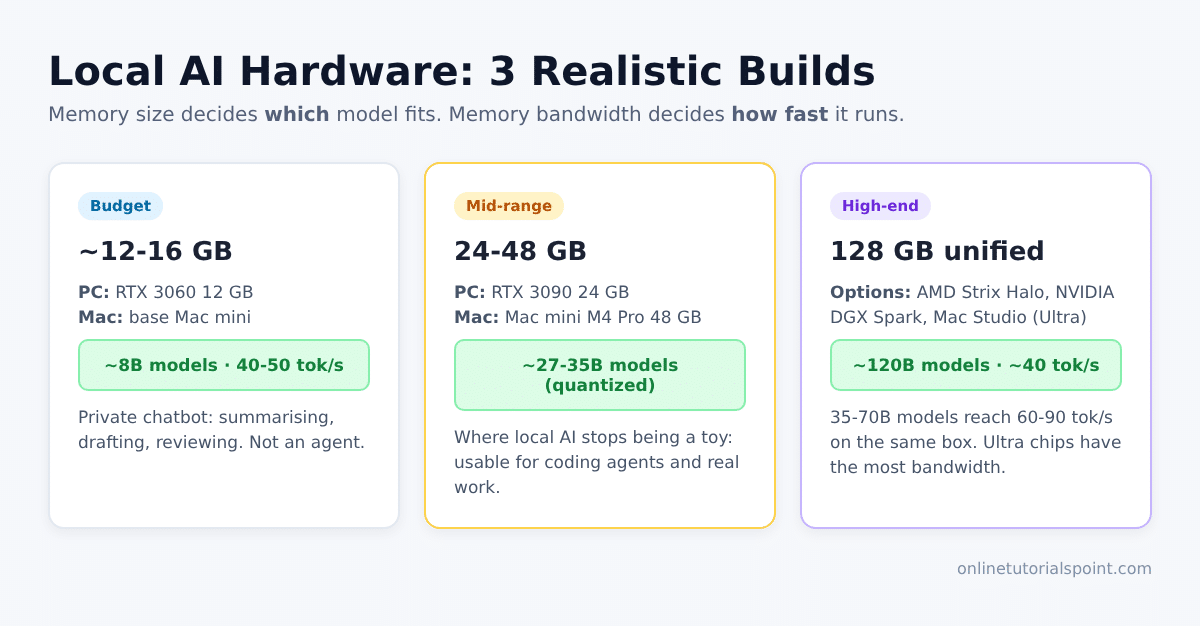
Budget Build (12–16 GB)
- PC route: a used RTX 3060 12 GB (around $300–$400; NVIDIA has even restarted production of this card). Expect about $800 for a complete PC.
- Mac route: a base Mac mini (around $800), running similar models a little slower.
- What it runs: ~8B models at roughly 40–50 tokens per second.
- Good for: a private chatbot for summarising, drafting and reviewing documents. It is not a reliable coding agent and will struggle with tool calling.
Mid-Range Build (24–48 GB)
- PC route: an RTX 3090 with 24 GB of VRAM and high bandwidth (around $800–$1,000 for the card).
- Mac route: a Mac mini with M4 Pro and 48 GB of memory (around $1,800).
- What it runs: quantized ~27B–35B models at comfortable speeds. The GPU is faster, while the Mac has room for larger or multiple models.
- Good for: this is where local AI stops being a toy. You can use it with coding agents and get real work done.
High-End Build (128 GB Unified Memory)
- Options: an AMD Strix Halo mini PC (around $2,500), an NVIDIA DGX Spark (around $5,000), or a high-memory Mac Studio / MacBook Pro.
- What it runs: ~120B-parameter models, which are noticeably smarter.
- Real-world speed: on a DGX Spark, 120B models reach about 40 tokens per second. Meanwhile, 35B–70B models hit 60–90 tokens per second, which feels instant for chat.
- Watch out: most 128 GB boxes have slower bandwidth. Apple’s Ultra-class chips offer several times more bandwidth, but they are also the most expensive option.
Phase 5: Tools to Run Local AI Models
A model file alone does nothing. You need a runtime that loads it and, ideally, exposes a local API server. Three popular choices are:
- Ollama – a simple command-line tool and local API. Run
ollama run qwen3and you are chatting in minutes. - LM Studio – a desktop app with a friendly UI for browsing, downloading and chatting with models.
- Docker Model Runner – runs models as part of your Docker workflow, which is handy for developers.
All three can serve an OpenAI-compatible endpoint. As a result, you can plug local models into VS Code extensions, coding agents or chat interfaces. If you already use cloud assistants, compare them in our guide to AI debugging tools: GitHub Copilot vs Claude vs ChatGPT.
Who Is Local AI Actually Worth It For?
Local AI is great and improving fast. Still, it has real limits. Here is a clear split.
Go Local If You…
- handle sensitive data, such as health, legal, financial or client code, that must never leave your machine;
- need AI offline, for example while travelling or in air-gapped environments;
- run high-volume, repetitive jobs (classification, summarising, embeddings) where API bills add up;
- want a stable model that never changes under you, or you enjoy learning how LLMs work;
- already own a capable GPU or a high-memory Mac.
Stay With the Cloud If You…
- need the smartest possible answers for complex coding, research or reasoning;
- would have to buy new hardware just to start;
- don’t want to spend time on setup, updates and troubleshooting.
For most people, $20–$60 a month on a cloud AI subscription buys faster, smarter models with zero maintenance. Many developers, therefore, choose a hybrid setup: local models for private and routine work, and the cloud for hard problems. For better prompting with cloud tools, see how to use ChatGPT for code reviews.
Local AI FAQs
Is local AI cheaper than ChatGPT or Claude subscriptions?
Usually not. A budget build costs around $800 and a capable one costs $2,000 or more, plus electricity. At $20–$60 per month, a subscription takes years to match that cost. Local only wins on price if you already own the hardware or you run very high volumes through an API.
Can a local model replace Claude or GPT for coding?
Not fully. Models in the 27B–35B range can handle coding agents for everyday tasks, and 120B models get closer. However, they still trail frontier cloud models on large, multi-file changes and complex reasoning.
How much VRAM do I need to start?
12 GB is a practical minimum for useful 7B–8B models. 24 GB is the sweet spot for 27B–35B models, and 64–128 GB of unified memory opens up 70B–120B models.
Mac or NVIDIA GPU for local AI?
Choose an NVIDIA GPU for speed on models that fit in its VRAM. Choose a Mac with lots of unified memory, on the other hand, to run larger models more quietly and efficiently, at lower tokens per second.
Is my data really private with local AI?
Yes, as long as both the tool and the model run on your device. Use the Wi-Fi test: if it still works offline, your prompts are not leaving your machine. Even so, always check that a “local” app does not quietly call a cloud API.
What is a good first model to try?
Install Ollama or LM Studio and try a small Qwen, Llama or Gemma model of about 4B–8B parameters. Then move to the largest version your memory can hold.
Conclusion
Local AI gives you privacy, control and freedom from subscriptions, but it costs you raw intelligence and requires upfront hardware. Remember the core rules: the model must fit in fast memory, bandwidth decides speed, and 8B–35B quantized models are the sweet spot for most machines. If privacy or offline use is essential, start with a mid-range build and Ollama or LM Studio. Otherwise, a cloud subscription, perhaps paired with a small local model for private tasks, is the smarter choice in 2026.


